
Game Over on Booking Chaos-Sports Facility Software That Scores

Your field calendar shouldn't live in three places. Neither should your payments.
But that is exactly how a normal week goes for many sports directors. One coach texted a court. A parent asks for Saturday morning. A trainer insists they have already paid. Meanwhile, your spreadsheet says one thing; your payment app says another, and the cash box knows the real story.
Facility management should feel bored. Open the venue. Approve the right hours. Take the right deposit. Track who paid. Close the books. SportsPlus gives sports clubs, parks, venues, federations, and event operators one system for that work, both online and through the SportsPlus mobile app.
The five facility management headaches SportsPlus fixes
Most booking problems don't start with the calendar. They start when availability, pricing, payments, and accounting all live in different places. These are the five headaches that keep sports administrators stuck in cleanup mode.
1. Foul Play: Double Bookings and the "I Thought We Had It" Excuse: one field, two groups, no winner. When requests come through email, phone calls, paper calendars, and front-desk notes, nobody has the full picture. Staff waste time checking availability instead of running programs.
Closures make it worse. If maintenance work, holidays, or private events don't reach the public calendar, someone will still try to book that time. Then you are apologizing, moving groups, and refunding payments you never should have taken in the first place.
2. Wrong Playbook: Forcing One Booking Rule on Every Space. A turf field, batting cage, party room, and basketball court don't rent the same way. Some users need a quick 45-minute session. Others need the whole day. Some facilities work best with fixed one-hour slots. Others need flexible start and end times.
A basic booking tool often forces one setup in every space. That is fine until your Tuesday morning pickleball group and Saturday tournament crew ask for two completely different arrangements.
3. Dropped Balls: Chasing Deposits, Unpaid Balances, and No-Shows. Prime-time slots disappear fast. If someone can reserve one without paying, your staff takes all the risks. A no-show leaves the court empty, and a late cancellation can turn your best revenue window into dead time.
Then there is an awkward part. Someone has to ask for the deposit. Someone else has to record the balance. If the customer pays at the front desk, another person has to update the booking record so the numbers match.
4. Leaving Points on the Board: Flat Pricing and Missed Add-On Revenue. Charging the same rate at 10 a.m. and 6 p.m. sounds simple. It also leaves money on the table. Peak hours should carry peak prices, especially when demand outstrips supply.
The same goes for extras. Cleaning fees, ball rentals, after-hours access, refreshments, and merchandise often get handled through side invoices or a separate card reader. That creates more admin work and gives customers more chances to skip the add-on.
5. Post-Game Film Session: Month-End Reconciliation That Feels Like Detective Work. A booking can be paid online, paid in part in person, or updated later by staff. If your booking platform doesn't connect to your accounting system, someone has to export records, compare transactions, and enter everything by hand.
That is where errors creep in. One missed cash payment or duplicated entry can make the whole report look wrong. Your treasurer loses time, and your board loses confidence in the numbers.
The SportsPlus Five-Point Game Plan to fix booking chaos
SportsPlus doesn't treat facility booking as a simple calendar widget. It integrates availability, booking rules, checkout, payment tracking, and accounting into a single workflow.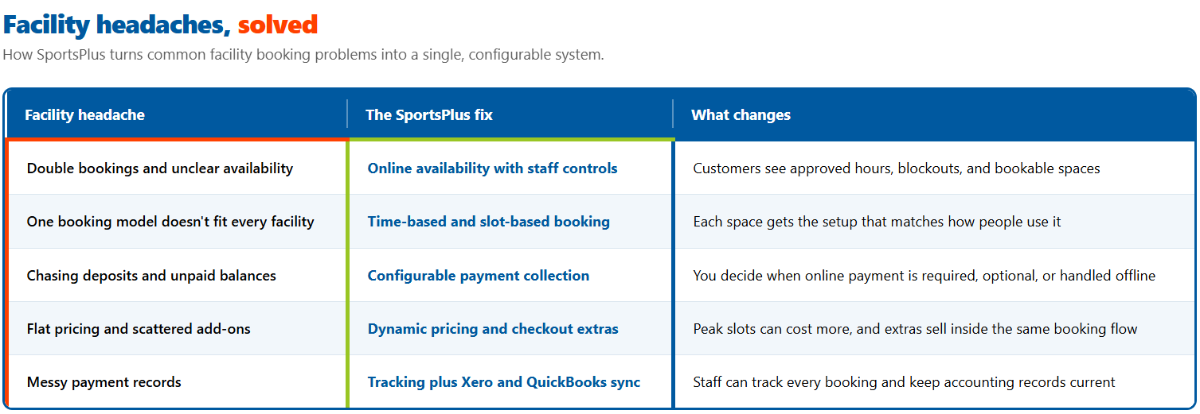
Staff can track every booking and keep accounting records current
Play 1: Put real availability online and keep staff in the coach's seat. SportsPlus lets staff open facilities for online booking in a few clicks. Customers can reserve fields, courts, and other venues through your online booking page or the SportsPlus mobile app.
That doesn't mean giving up control. Staff set the operational timings, so customers can only book during approved hours. If the lights go off at 8:30 p.m., nobody should book a 9 p.m. session.
You can also set blockout dates and times for any period when a facility is unavailable. Use them for maintenance, holidays, staff training, private events, or weather-related closures. The public booking calendar stays honest because the unavailable times stay closed
Play 2: Match the booking model to the specific space. SportsPlus supports time-based bookings and slot-based bookings. Pick the one that fits each facility instead of forcing every space into the same setup.
Time-based bookings for flexible rentals. Time-based bookings let customers reserve a facility for any duration within your operating hours. Staff can set minimum and maximum booking limits, such as 30 minutes to 3 hours, so users get freedom without taking over the whole day.
Pricing stays flexible, too. You can charge by the hour or set a price for the entire day. SportsPlus calculates the total from the time the customer selects, so nobody has to do the math at the front desk.
Slot-based bookings for structured schedules: Slot-based bookings work well when your facility runs on predictable blocks. Staff can set the slot duration, often one hour, and let customers choose from the available times.
You can assign a single default price to every slot or enable dynamic pricing. You can also close specific slots when a space isn't available. That gives you structure without boxing yourself in.
Play 3: Collect money exactly how each facility needs it. Payment rules shouldn't be one-size-fits-all. SportsPlus lets you choose the checkout setup for each facility:
- Require online payment to complete the booking when you want full payment upfront.
- Make online payment optional, allowing customers to pay now or later.
- Turn off the online payment requirement when you accept offline or on-site payment.
You can also collect a percentage deposit at booking. That helps secure the reservation and gives customers a reason to show up or cancel in time.
Need to add charges that don't fit into the base rental price? Add them to the booking. SportsPlus supports extra charges such as cleaning fees, equipment rentals, and after-hours access.
Play 4: Price prime hours right and upsell in the same checkout. Your 6 p.m. court slot shouldn't always cost the same as your 10 a.m. slot. With slot-based bookings, SportsPlus lets you set different prices for each time slot on each day of the week.
For example, you might charge $65 for peak slots from 4 p.m. to 8 p.m. and $40 for the rest of the day. That kind of pricing helps match demand without a staff member having to quote different rates all week.
SportsPlus also lets you offer additional items during the booking process. Training equipment, refreshments, and merchandise can appear in the same checkout flow. Customers see the option while they are already booking, and your staff doesn't have to create a separate order.
Play 5: Track every booking and keep the books clean. Once reservations start coming in, SportsPlus gives administrators a clear view of every booking and its payment status. You can see what is paid, what is still open, and which records need attention.
For on-site or offline payments, staff can manually update the booking record. That keeps the reservation and payment history accurate even when the customer pays at the venue.
SportsPlus also connects directly with Xero and QuickBooks. Booking transactions sync into your accounting system automatically, so your staff doesn't have to re-enter the same numbers. You get a clean, transparent, auditable trail for every payment, and your books stay current without another spreadsheet.
What this looks like on a busy Saturday
Picture Court 2 at a community sports venue. Staff open the court online, set operating hours from 7 a.m. to 9 p.m., and create one-hour slots. The morning slots cost $40. The high-demand block from 4 p.m. to 8 p.m. costs $65.
A local trainer books two peak slots through the mobile app. SportsPlus collects the required deposit, adds a cleaning fee, and offers ball rental at checkout. Another customer books a morning slot but chooses to pay later because that facility allows optional online payment.
The front desk sees both reservations in one place. When the second customer pays in person, staff update the payment status. The transaction records then sync with Xero or QuickBooks. No double entry. No mystery balance. No phone call asking who has the court.
Which sports organizations benefit most?
SportsPlus fits organizations that need to book flexibility and payment control without adding another admin tool.
- Sports clubs and leagues can manage practice spaces, match venues, and shared facilities with greater clarity on availability.
- Parks and recreation departments can open community spaces online while keeping approved hours and closures under staff control.
- Sports facilities and venue operators can use deposits, peak pricing, and add-ons to protect revenue.
- Governing bodies and federations can bring more consistent booking and payment rules to the venues they manage.
- Tournament operators and event organizers can block setup windows, manage structured schedules, and track payments in one place.
The bottom line for sports directors
Your booking system shouldn't create another inbox. It should make the calendar obvious, the price clear, the payment status up to date, and the accounting clean.
SportsPlus brings those jobs together. Staff control availability. Customers book online or through the mobile app. Deposits, extra charges, and add-ons fit into the same flow.

Nathan Uppara
Digital Marketing Lead at SportsPlus
Nathan Uppara is the Digital Marketing Lead at SportsPlus, where he helps sports organizations discover better ways to manage registration, payments, scheduling, communication, websites, and mobile apps. He combines his experience in digital marketing and sports technology to create practical content and resources for clubs, leagues, and sports organizations.
Latest in Sports Admins

What Features Should a Youth Sports Club Website Have in 2026?
Oct 9, 202616
What Should a Modern Sports Organization Website Actually Do?
Oct 2, 202660
Why Generic Website Builders Dont Work for Sports Organizations
Sep 18, 202663
Smarter Sports Management with AI-Powered Features in SportsPlus
Jan 7, 2026182
Streamline Registration Payments and Eliminate Admin Headaches with SportsPlus
Oct 15, 2025273
Popular in Sports Admins

Top 6 Golf Online Stores
Dec 14, 202310913
Top 5 Tennis Online Stores
Dec 14, 20239056
The All-in-One Playbook for Stress-Free Sports Fundraising
Dec 13, 20232182
Top 10 Sports Website Builders Compared (Why Most Will Cost You Registrations)
Jun 18, 20241562
Player Stats-Importance,Popularity,Usage
Dec 15, 20231430